Organization API keys
Manage independent access and permission policies for shared integrations.
Organization API keys gives shared integrations their own access to withHuman. A key belongs to the organization and keeps its permissions when its creator changes roles or leaves. Organization API keys are part of the hosted edition: the open edition offers personal API keys only.
Use a personal API key when a script should follow your own access instead.
Permission policies
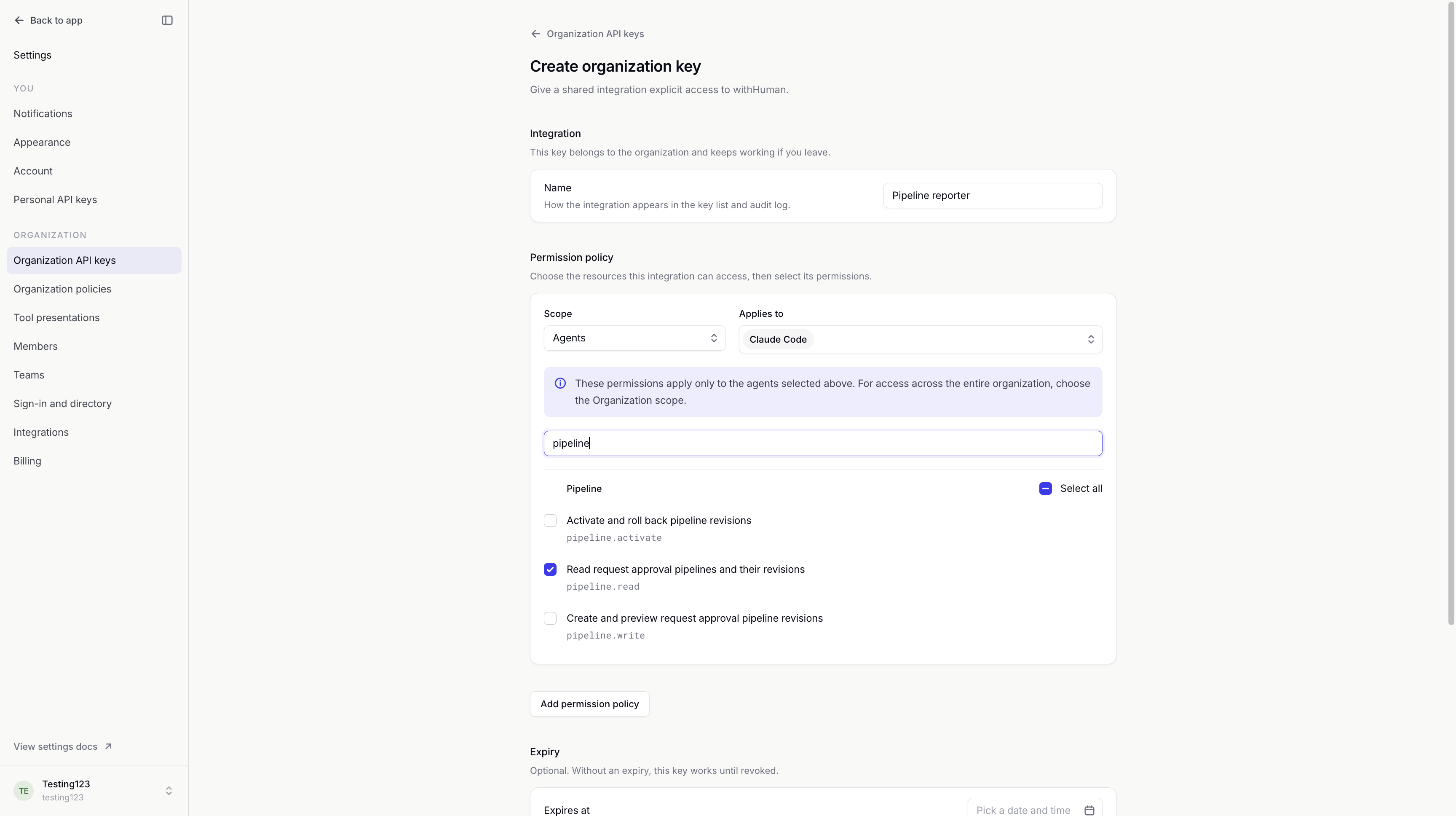
Each key has its own permission policies. Permissions chooses the actions it can perform. Scope and Applies to choose the resources those actions cover.
| Scope | Access applies to |
|---|---|
| Organization | The whole organization, including future resources. |
| Teams | The selected teams and their supported team features. |
| Agents | The selected agents, including their approval pipelines. |
Multiple policies add access together. For example, a key can read one agent's pipeline and another team's escalation policy. Removing a policy removes only the access it supplies.
Organization keys can read requests and manage supported configuration when granted the relevant permissions. They cannot claim, approve or deny requests, manage human identities or grant permission policies. The editor offers only permissions available to this key type.
Configuration access can still affect approvals. A key allowed to activate pipelines can change how future requests are decided, even though it cannot make a human decision itself.
Example: Pipeline reporter
We'll give Pipeline reporter permission to read the Claude Code agent's approval pipeline, using Agents scope. Our shared reporting service can inspect those rules without changing them or reading other agents' pipelines. Its access continues when the person who created the key leaves.
Changes to access
Manage permission policies lets an authorized person add, edit or remove a key's policies after creation. Saved changes take effect on its next API call, without replacing its secret. There is no separate activation step.
The key detail page shows its permissions and scopes. Unavailable marks a grant the key cannot currently use.
See Permissions for how policies combine, and the Permission reference for scope definitions.
Key list and history
The inventory is separate from personal keys. Search by name, public prefix or permission, and filter by Active, Expired or Revoked.
A key's detail page shows who created it, when it was created, its expiry and last use, and when it was revoked. The secret cannot be retrieved. Activity performed with an organization key is attributed to that key in Audit log.
Expiry and replacement
An expiry date stops the key automatically. Leaving it blank uses the deployment's maximum lifetime, if one is configured; otherwise the key has no expiry.
To rotate the secret or change the expiry, create a replacement and update the integration. Revoke the old key once the replacement works. Revocation takes effect immediately and cannot be undone; the key remains available as history. Expired and revoked keys have read-only permission policies.
The API keys overview explains saving the one-time secret and verifying a key from a script.
Access and availability
Viewing keys, issuing organization keys and revoking keys are separate permissions. Creating a key or changing its policies also requires permission to manage policies for the chosen resources. You can grant only access you hold yourself.
Creating keys and editing their policies require a recent sign-in and any multi-factor authentication required by the organization. Viewing the policy editor also needs permission to read or manage policies. API keys cannot manage these policies themselves.
Organization policies can turn off organization API keys. Existing keys remain listed, but cannot authenticate until the setting is enabled again. A key can therefore have Active status and still show Authentication is disabled. Turning off personal keys does not affect it.
See the API keys reference for the management API.